
Getting Started
Welcome to BasisVR Documentation
Welcome to the Basis wiki!
This page will help provide the minimum required steps, in order to get a Basis project up and running, including how-to guides for creating Avatars and World asset bundles.
Current System Requirements
https://docs.unity3d.com/Manual/system-requirements.html
Compatible Unity Versions
Basis is developed against and frequently upgraded to recent Unity versions, current project versions are as follows:
✓ Developer
✓ Long-Term-Support
Installing Unity
We recommend installing Unity through Unity Hub. When adding the Basis/ subfolder of the repository, Unity Hub will automatically detect its project version.
- Hub - https://unity.com/download
- Standalone - https://unity.com/releases/editor/archive
Additional Unity Modules
Add the following modules via the "Add modules" screen when installing the Unity Editor version:
✓ Android Build Support
   ↳ ✓ OpenJDK
   ↳ ✓ Android SDK & NDK Tools
✓ IOS Build Support
✓ Linux Build Support (Mono)
✓ Mac Build Support (Mono)
✓ Windows Build Support (IL2CPP)
Even if you are only building user generated content for Avatar and World creation, you will still need these additional modules for making this content available on these platforms.
If you have the correct Unity version already installed but the "Add Modules" option isn't available it was likely installed externally from Unity Hub, please reinstall the correct Unity version from Unity Hub.
Acquiring the Basis framework
Install Git first — even if you download the project as a ZIP. Several of the framework's packages are pulled from Git repositories when Unity first opens the project (for example AudioLink, the Valve OpenXR utilities and RNNoise). If Git isn't installed and on your system PATH, those packages fail to resolve and the project opens with compile errors. Install Git, restart Unity Hub, then open the project. You can confirm Git is on your PATH by running git --version in a terminal.
Git
You can either directly clone the developer or long-term-support branches found at https://github.com/BasisVR/Basis or fork it to your own local repository. The Unity project is the Basis sub-folder inside the clone (Basis/Basis), see Opening the project in Unity Hub below.
Direct Zip Download
For those wishing to forgo the Git experience:
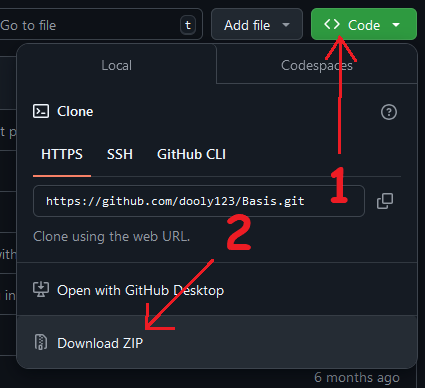
- Select 'Code' dropdown in the top right then Download ZIP.
- Unpack ZIP to any folder or destination you like. It unpacks to a folder named after the branch, for example
Basis-developer. - Add the
Basissub-folder inside it as an existing project in Unity Hub, as described in Opening the project in Unity Hub below.
Opening the project in Unity Hub
The folder you cloned or unpacked is the whole Basis repository, not the Unity project. The Unity project is the Basis sub-folder inside it, next to the server and tooling folders:
Basis-developer/         the folder you unpacked (a Git clone is simply named Basis)
├── Basis/               the Unity project: this is the folder to add in Unity Hub
│   ├── Assets/
│   ├── Packages/
│   └── ProjectSettings/
├── Basis Server/
├── tools/
└── ...- In Unity Hub open the Projects tab, click Add (Open in older Hub versions) and choose Add project from disk.
- Browse into the folder you unpacked or cloned, select the inner
Basisfolder and confirm. - The project now appears in the Unity Hub list. Click it to open it.
The correct folder is the one that contains Assets, Packages and ProjectSettings. If you pick the top-level folder (for example Basis-developer) instead, Unity Hub will not recognise it as a Unity project.
Resources
We have provided instructions for creating your first Avatar or World compatible with the Basis framework.
Please join the Basis Discord and join a community of developers and hobbyists to help you on your way!
Let's get started with BasisVR!
Last updated on