
Constraints
Understand the constraint components available in Basis and how automatic arm twist-bone support works.
Constraints describe how one transform should influence another. They can move an object, orient it toward a target, solve a chain of bones, or preserve a relationship between several references.
Basis provides its own constraint components and evaluates them as part of the avatar runtime. If you are converting an existing Unity avatar, the Unity and Animation Rigging names below show which familiar components map to each Basis constraint.
Basis currently defines 14 concrete constraint types in BasisConstraintType.
Transform constraints
These constraints are useful when the result is primarily a position, rotation, scale, or parent-like relationship.
-
Position —
BasisPositionConstraintblends a transform's position from one or more weighted sources. Use its axis masks when only some positional axes should follow the sources, and use offsets when the constrained object should keep a deliberate separation from them. This corresponds to Unity'sPositionConstraintand Animation Rigging'sMultiPositionConstraint. -
Rotation —
BasisRotationConstraintblends rotation from one or more sources. It supports per-axis masking and rotation offsets, which is useful for keeping part of an authored pose while following another transform. It corresponds to Unity'sRotationConstraintand Animation Rigging'sMultiRotationConstraint. -
Scale —
BasisScaleConstraintblends a transform's scale from one or more sources. It corresponds to Unity'sScaleConstraint. -
Parent —
BasisParentConstraintcombines position and rotation behavior so an object can follow parent-like sources without changing its hierarchy. It corresponds to Unity'sParentConstraintand Animation Rigging'sMultiParentConstraint.
Example: a parent constraint
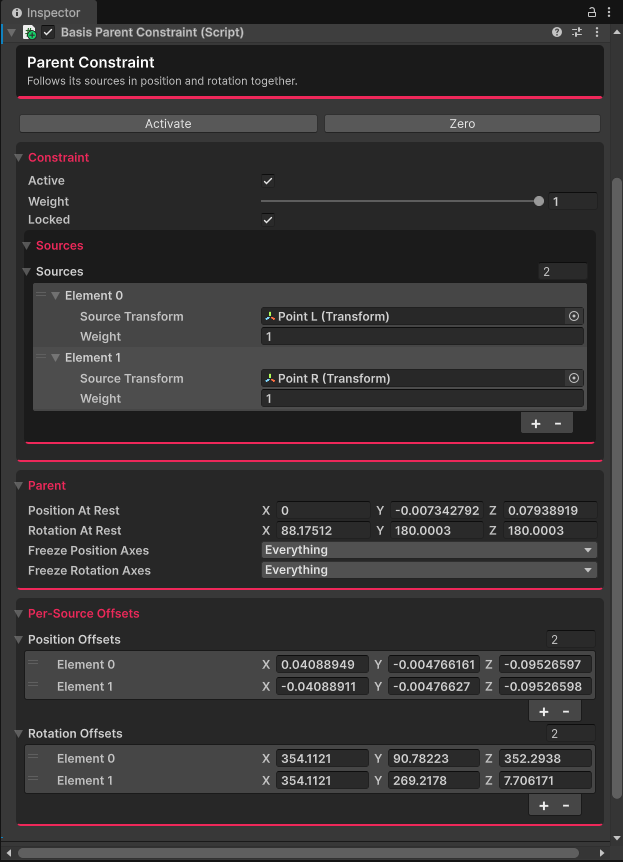
The Inspector example below shows a Basis Parent Constraint with two source transforms. Each source has a weight of 1, so the constrained object is driven by the combined result of Point L and Point R.
The Parent section stores the target's position and rotation at rest and lets you freeze individual position or rotation axes. The Per-Source Offsets section keeps a separate position and rotation offset for each source, which is useful when the target should follow a source without snapping directly onto it.
Direction and motion constraints
Use these when a transform needs to face a target, blend between poses, or follow another object with a particular kind of motion.
-
Aim —
BasisAimConstraintrotates an object so a configured local axis points toward the weighted positions of its sources. It corresponds to Unity'sAimConstraintand Animation Rigging'sMultiAimConstraint. -
Look at —
BasisLookAtConstraintturns an object toward its source positions using a look-at-style solve. It corresponds to Unity'sLookAtConstraint. -
Blend —
BasisBlendConstraintblends both position and rotation between two source objects. Use it when a transform should move continuously between two references rather than follow just one of them. It corresponds to Animation Rigging'sBlendConstraint. -
Override transform —
BasisOverrideTransformreplaces or offsets a transform's position and rotation. It can apply the override in relation to a source, which makes it useful for applying a controlled correction to an existing pose. It corresponds to Animation Rigging'sOverrideTransform. -
Damped transform —
BasisDampedTransformfollows a source with damped positional and rotational movement. The result catches up over time instead of snapping immediately to the source. It corresponds to Animation Rigging'sDampedTransform.
IK and twist constraints
These constraints solve relationships across multiple bones rather than treating each transform independently.
-
Twist correction —
BasisTwistCorrectionextracts axial twist from a source and applies a weighted share of that twist to a twist node. It corresponds to Animation Rigging'sTwistCorrection. -
Two-bone IK —
BasisTwoBoneIKsolves a three-joint chain, such as an upper arm, forearm, and hand, toward a target. An optional hint helps control which direction the middle joint bends. It corresponds to Animation Rigging'sTwoBoneIKConstraint. -
Chain IK —
BasisChainIKsolves a multi-bone chain toward a target. It corresponds to Animation Rigging'sChainIKConstraint. -
Twist chain —
BasisTwistChaindistributes twist between root and tip targets across a chain. During conversion, Basis creates one component for each bone in the chain. It corresponds to Animation Rigging'sTwistChainConstraint.
Reference relationships
- Multi-referential —
BasisMultiReferentialmaintains the relationship between several reference transforms. One selected reference acts as the driver, and the others follow its relationship. It corresponds to Animation Rigging'sMultiReferentialConstraint.
Shared constraint data
The following types support the constraint framework but are not concrete constraint components that you add as individual constraint behaviors.
-
BasisConstraintBaseis the common base component. It stores the values shared by constraints, including weight, active and locked state, source data, and the authored evaluation order. -
BasisConstraintSourceEntryrepresents one source. It contains the sourceTransformand that source's relative weight. -
BasisConstraintAxescontrols which axes a constraint affects. Its values areNone,X,Y,Z, andAll. -
BasisConstraintWorldUpselects the reference used when a constraint needs an up direction. Its values areSceneUp,ObjectUp,ObjectRotationUp,Vector, andNone.
Automatic arm twist-bone support
Basis includes automatic arm twist-bone generation and support as part of its full-body IK workflow. It is not represented by a BasisConstraintBase component, so it will not appear as a separate constraint in the hierarchy.
The behavior is implemented inside BasisFullIKConstraintJob. After the arm IK solve, Basis:
- Looks for direct children of the upper and lower arm bones whose names contain
twistorroll. - Binds those transforms into the full-body IK job.
- Runs the twist-bone step after the arm has been solved.
- Writes the detected twist bone's world rotation directly.
This means a twist bone can have a rotation driver even when there is no BasisRotationConstraint on it. When troubleshooting a twist conflict, check the arm hierarchy for these direct-child names as well as checking the constraint components.
Last updated on
Authored Motion
Authored Motion drives cosmetic and secondary movement — tails, ears, accessories — through one batched job instead of a per-avatar Animator, so it stays cheap even in a crowded instance.
Face Tracking
Setting up face and eye tracking on a Basis avatar — the components and avatar fields involved, and the full step-by-step guide.