
Building
The Basis Encrypted Extension (BEE) File
Basis stores user-generated content as a .BEE file which contains your compiled asset and metadata about it. Each generated .BEE file comes with a randomly generated password used to access it, both of which can be found in the root directory of your Unity project at: Basis\Basis\AssetBundles.
Avoid Duplicate GameObjects
- By default, the BasisAvatar component will rename all duplicate name GameObjects within the avatar's hierarchy.
If you enable Do not auto-rename bones in the Processing Options. Ensure that there are NO duplicate named GameObjects within the hierarchy of your avatar, including the armature, as this will cause your avatar to fail to load after building the AssetBundle.
Build the AssetBundle
- At the bottom of the Basis Avatar component on your Avatar, check that the appropriate build targets for your content are enabled. Basis supports various target platforms, including: Windows, Android, Mac, Linux and IOS.
- Press the 'Create Avatar Bee File' button and wait for this process to complete.
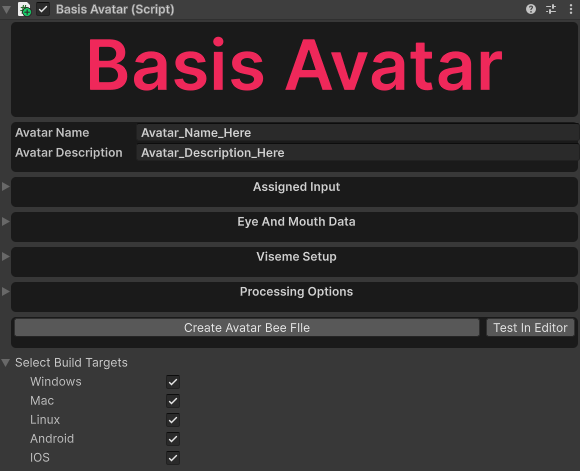
- The results will be opened in a new window automatically as shown below.
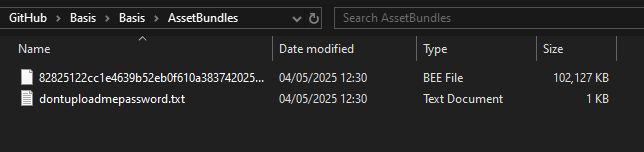
- Depending on your hardware, each platform may take an average of a minute or two to build the first time. Subsequent builds should take less time due to caching. Building for all platforms will likely take additional time and increase the overall file size.
Nice to know:
-
You can conveniently use a custom password for your generated BEE file instead. This can make things easier to remember if you prefer a single password to use for different BEE files.
-
If you prefer, you can also replace the generated .BEE file name with something more easily memorable. Keep in mind that reusing the same name will result in any previous version being replaced by the new one!

January 2026 Anecdote: An avatar with 18 materials using Poiyomi URP with 120K polygons, with package size 45MB per platform, took 9m 43s on a Ryzen 7 9800x3D to build for all target platforms.